Keyboard focus
follows your eyes.
Look at another screen, window or split pane and start typing. Eyeshift uses the webcam you already have to move focus there. No clicking, no extra hardware.
A free alternative to Glance Switch · MIT licence
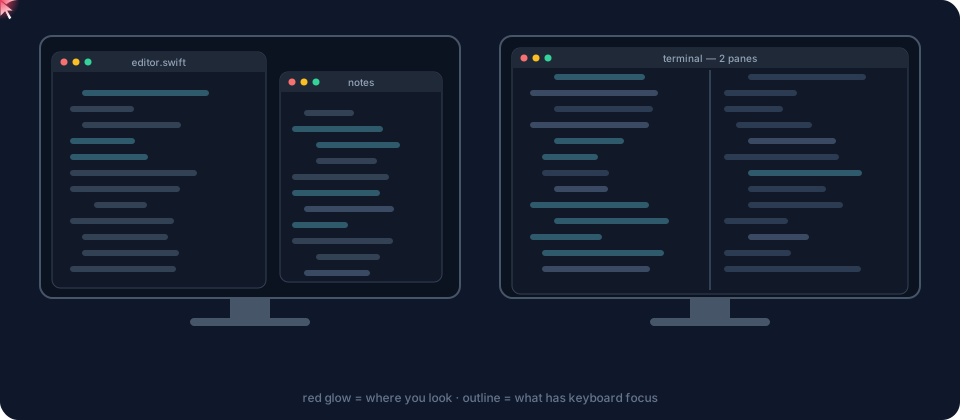
Built for too many windows and monitors
I kept typing into the wrong Claude window with several open side by side. Now whichever one I'm looking at is the one that gets my keystrokes.
Eye-tracking focus switching for Mac
Everything you'd expect from a gaze focus switcher, and it keeps getting better the more you use it.
Screens
Turn toward another monitor and focus, and the pointer, move there.
Windows
Look at another window on the same screen and it comes forward, ready for typing.
Split panes
iTerm2, Terminal, Ghostty, VS Code, Cursor, Zed, Xcode, JetBrains IDEs and more.
Stays out of your way
Never moves focus while you type, use the mouse, or glance down at your keyboard.
Learns as you work
Every click and keystroke teaches it where you were looking. Wrong switch? Click where you meant and it nudges itself.
Any webcam, or two
The built-in camera is enough. Add a second webcam on your other screen for extra accuracy there.
Your camera never leaves your Mac
Frames are processed in memory with Apple's Vision framework and thrown away immediately. Nothing is recorded, saved or sent anywhere. No account, no analytics, no network.
How it compares
The only free, open-source option that switches screens, windows and split panes with a plain webcam.
| Eyeshift | Glance Switch | Tobii eye trackers | macOS Head Pointer | AutoRaise | |
|---|---|---|---|---|---|
| Moves keyboard focus where you look | Yes | Yes | Needs extra software | Moves the pointer | Follows the mouse |
| Screens, windows and split panes | Yes | Yes | — | — | Windows only |
| Works with a normal webcam | Yes | Yes | Dedicated hardware | Yes | n/a |
| Free and open source | Yes, MIT | Paid | No | Built in | Yes |
| Learns from your clicks and typing | Yes | — | — | — | — |
Get started
One command with Homebrew, or a plain download. Then a short calibration and you're set.
# macOS 14+, Apple silicon or Intel
brew tap chaibreak/tap
brew trust --tap chaibreak/tap
brew install --cask eyeshift
open -a Eyeshift
No Homebrew? Download the zip, move Eyeshift to Applications, then right-click it and choose Open the first time.
Allow camera and Accessibility
The welcome guide walks you through both.
Calibrate
About 45 seconds per screen: follow a few dots.
Just look and type
⇧⌘G pauses any time.
Questions
Everything people ask before switching focus with their eyes.
Is there a free alternative to Glance Switch?
Yes. Eyeshift is a free, open-source (MIT) Mac app that does the same job as Glance Switch: it uses your webcam to move keyboard focus to the screen, window or split pane you're looking at.
How do I switch focus between monitors by looking at them on a Mac?
Install Eyeshift (brew install --cask eyeshift from the chaibreak/tap Homebrew tap, or download it from GitHub), allow camera and Accessibility access, and run the 45-second calibration. After that, turning toward another monitor moves keyboard focus and the mouse pointer to it automatically.
Does eye-tracking focus switching need a Tobii or special eye tracker?
No. Eyeshift works with the built-in FaceTime camera or any USB webcam. You can add a second webcam on another screen for better accuracy there.
Can it focus split panes in my terminal or editor?
Yes. Eyeshift moves focus between split panes in iTerm2, Terminal, Ghostty, Warp, kitty, WezTerm, VS Code, Cursor, Windsurf, Zed, Sublime Text, Xcode, JetBrains IDEs and Android Studio.
Will it steal focus while I'm typing?
No. Eyeshift never moves focus while you type, while you're using the mouse, or when you look down at your keyboard.
Is my camera feed private?
Yes. Frames are processed in memory on your Mac with Apple's Vision framework and discarded immediately. Nothing is recorded, saved or sent, and Eyeshift has no network access, account or analytics.
How accurate is webcam eye tracking?
Good to about a thumbnail-sized area, which is plenty for picking a screen, window or pane. It is not precise enough to replace the mouse. Eyeshift keeps learning from your clicks and typing, so it gets more accurate over time.
Does Eyeshift work on Windows or Linux?
Not yet. Eyeshift is a native macOS app for macOS 14 Sonoma and later, on Apple silicon and Intel Macs.